Ecosizing — User Manual

1. Introduction

Ecosizing is an intelligent microgrid planning and operation simulation platform that helps energy engineers and project developers design optimal renewable energy systems with maximum economic returns over their entire lifecycle.

1.1 What Ecosizing Does

Ecosizing solves the complex challenge of determining the optimal configuration of microgrid components—including PV system and battery energy storage system under Design Mode . It answers critical questions such as: What equipment should be installed? How much capacity is needed? What operational strategy maximizes profitability while ensuring reliable power supply?

Additionally, Ecosizing offers an Operation Mode that evaluates the economic performance of a predefined capacity configuration. This mode is valuable when you already have a specific equipment layout in mind—whether from preliminary studies, vendor proposals, or existing installations—and need to assess its financial viability, compare different design alternatives, or validate third-party recommendations before committing to investment.

1.2 Core Capabilities

Design Optimization:

Operation Simulation:

Financial Analysis:

Design Report: (coming soon)

1.3 Why Ecosizing is Reliable

Unlike heuristic or simulation-based tools, Ecosizing uses proven mathematical optimization solvers (CBC, Gurobi) to find provably optimal solutions. The MILP formulation ensures that results are unique, optimal, and interpretable—not dependent on random initial conditions or approximation algorithms. This mathematical rigor provides confidence that the recommended design truly maximizes economic value under the given constraints.

1.4 What You Get

1.5 Typical Use Cases

Ecosizing is designed for energy consultants, project developers, utilities, and research institutions seeking rigorous, data-driven microgrid design solutions.

2. System Requirements

3. Quick Start

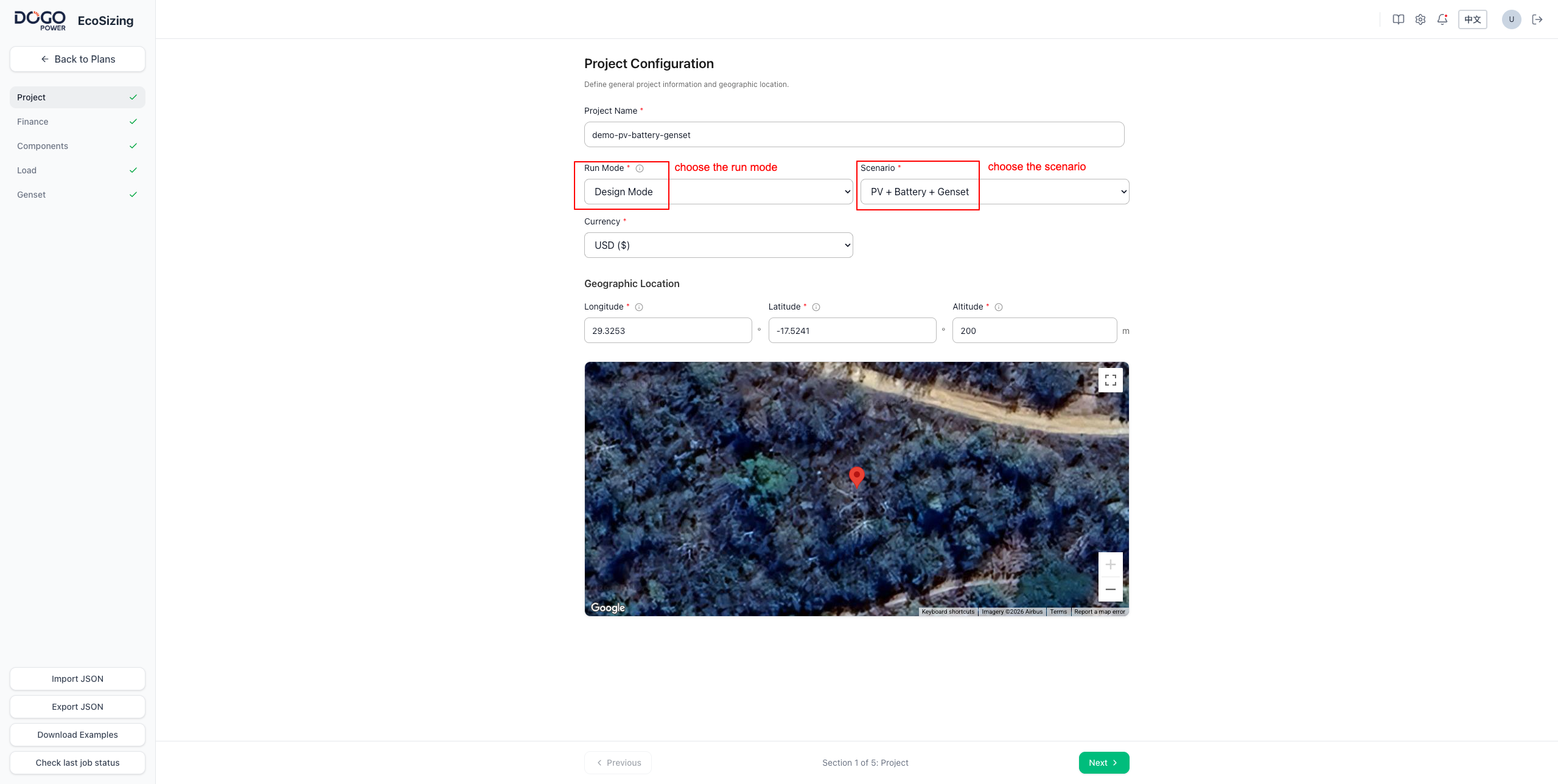
  1. Step 1: Input Project Configuration, select Run Mode (Design Mode: optimize equipment capacity; Operation Mode: evaluate given capacity) and Scenario.
  2. Step 2: Configure Finance Parameters (Loan, Tax).
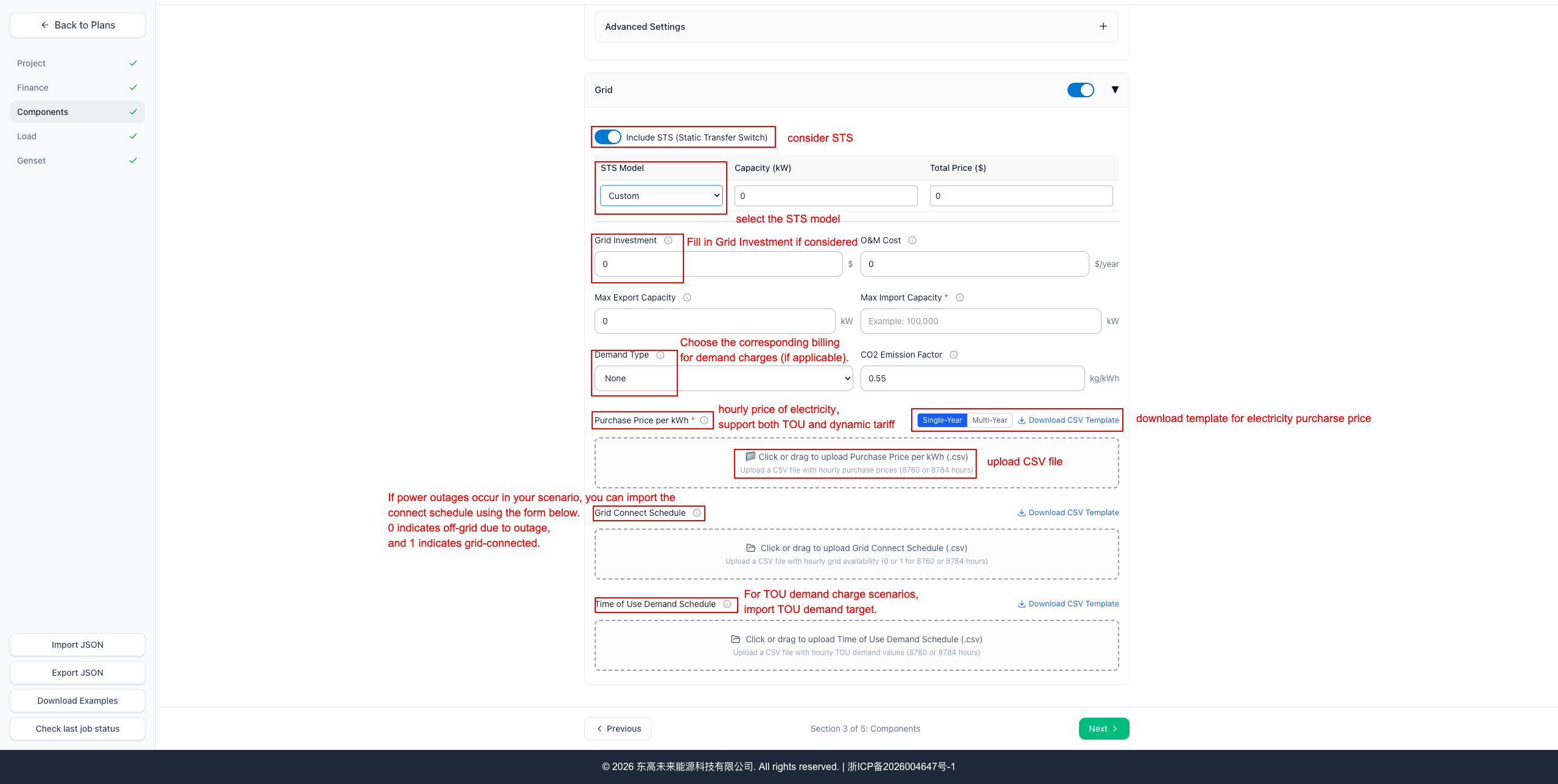
  3. Step 3: Configure Components (PV System-AC, PV System-DC, BESS, Grid).
  4. Step 4: Configure Load (load profile).
  5. Step 5: Configure Genset (if applicable).
  6. Run simulation.
  7. Review Results: investment scheme, operation policy, KPIs, cash flow, design reports.

4. UI Tour (Page-by-Page)

4.1 Authentication & Session

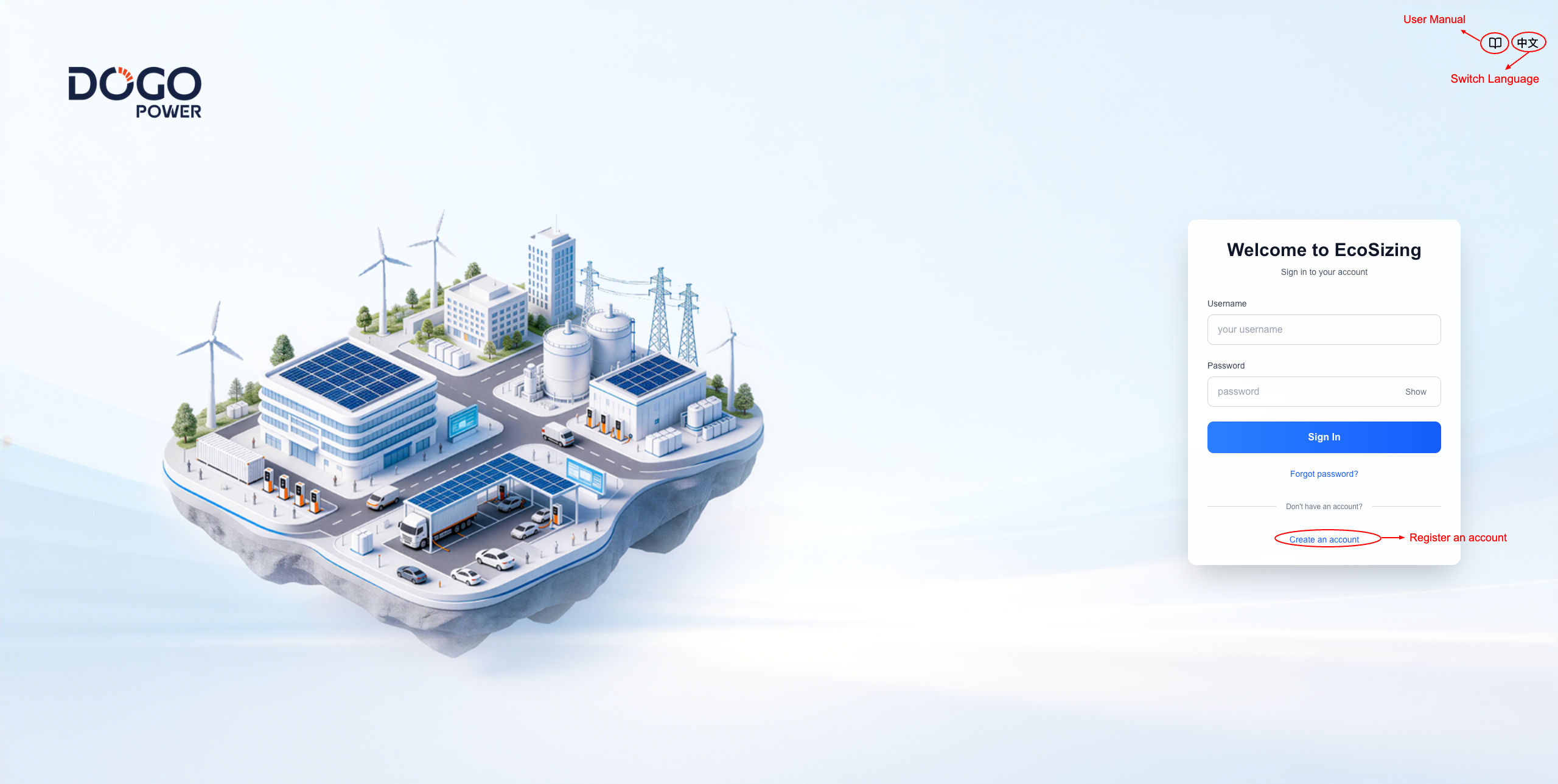
Ecosizing provides a secure authentication system with user registration, login, email verification, and password recovery. Session management ensures your work is preserved during long optimization runs.

Registration

Sign In

4.2 Getting Started: Two Ways to Configure Your Project

After signing in, click + New Plan to new an optimization job, you can set up this project using one of two methods:

Method 1: Import JSON Configuration (Quick Start)

Method 2: Manual Configuration (Step-by-Step)

Switching Between Methods:

4.3 Configuration Parameters Reference

4.3.1 Project Configuration

Project field reference

Field JSON path Unit Range / Default Required when Description
Project Name project.project_name free text always Human-readable project identifier used in reports and exports.
Run Mode project.run_mode enum design | operation always design optimizes capacities then simulates; operation simulates only using given capacities.
Scenario project.scenario enum one of the six scenario ids always Selects the system topology and drives which components are required.
Currency project.currency enum CNY | USD | EUR always All monetary values in the config and reports use this currency.
Time Resolution project.time_resolution minutes 15 | 30 | 60 (default 60) always Simulation step length. Full-year time-series lengths: 35040/35136, 17520/17568, or 8760/8784 points. Grid fields (purchase price, grid connect, TOU demand) accept coarser input and are auto-expanded.
Longitude project.longitude deg -180 – 180 always East positive, West negative. Drives PV auto-generation and weather-based modeling.
Latitude project.latitude deg -90 – 90 always North positive, South negative. Also used as the default PV tilt when auto-generating.
Altitude project.altitude m -500 – 9000 always Site elevation above sea level; used in PV resource modeling.

4.3.2 Finance Parameters

Finance field reference

Field JSON path Unit Range / Default Required when Description
Project Life finance.project_life years 10 – 30 always Number of years over which lifecycle cash flows are computed.
Capital finance.capital currency number > 0 or no limit always (defaults no limit) Maximum CAPEX budget. Leave empty for no limit
Invest Mode finance.invest_mode enum self_invest | ppa always Determines revenue calculation.
Expected Annual ROI finance.expected_annual_roi % 5 – 100 (default 10) optional Expected annual return on investment benchmark.
Construction Rate finance.construction_rate % 0 – 100 (default 10) always Civil + installation cost multiplier on equipment CAPEX.
Discount Rate finance.discount_rate % 0 – 100 always Applied to every future cash flow to obtain present value.
Insurance Rate finance.insurance_rate % 0 – 1 always Annual insurance premium as % of CAPEX.
Depreciation Period finance.depreciation_period years 1 – project_life optional If empty, defaults to project life.
Salvage Ratio finance.salvage_ratio % 0 – 20 always Residual asset value (% of CAPEX) recovered in the final year.
Tax Included finance.tax.included bool true / false always Toggles the whole tax block.
Income Tax Rate finance.tax.income_tax_rate % 0 – 100 if tax.included Corporate income tax.
Equip VAT Rate finance.tax.equip_vat_rate % 0 – 100 if tax.included VAT on equipment; deductible as input VAT.
Service VAT Rate finance.tax.service_vat_rate % 0 – 100 if tax.included VAT on installation/fuel/service.
Surtax Rate finance.tax.surtax_rate % 0 – 100 (default 0) optional Surcharges on VAT payable.
Stamp Duty & Fund finance.tax.stamp_duty_and_fund_rate % 0 – 100 (default 0) optional Taxes on revenue (ex-VAT).
Loan Included finance.loan.included bool true / false always Toggles the whole loan block.
Loan Ratio finance.loan.loan_ratio % 0 – 100 if loan.included Debt-to-CAPEX ratio.
Loan Interest Rate finance.loan.loan_interest_rate % ≥ 0 if loan.included Nominal annual rate.
Loan Period finance.loan.loan_period years 1 – project_life if loan.included Repayment term.
Repayment Type finance.loan.repayment_type enum equal_principal | equal_installment if loan.included Linear vs annuity.
Land Included finance.land.included bool true / false always Toggles the land-cost block.
Land Cost finance.land.land_cost currency > 0 if land.included unit cost of land acquisition.
Land Area finance.land.land_area area > 0 if land.included Land area value.
Area Unit finance.land.area_unit enum sqm | mu | acre if land.included Unit of land_area.

4.3.3 Components

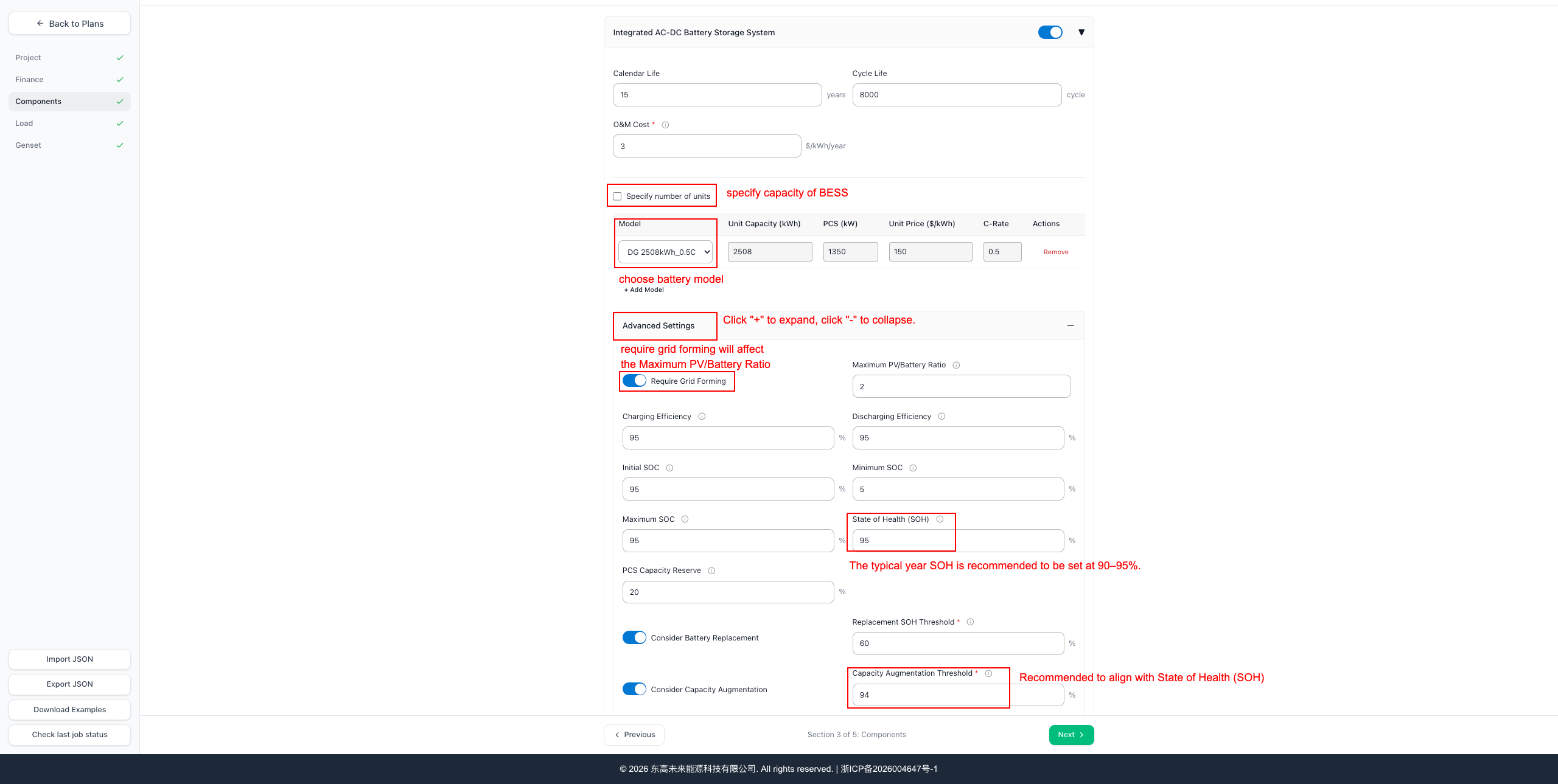
Each technology component has an included field and an Alternative Models array (the lib array in JSON) for the equipment library. When included is true, relevant parameters become required. Library entries have Unit Capacity, Unit Price, and Selected Number fields.

| Arbitrage Threshold | battery.arbitrage_threshold | {currency}/kWh | ≥0 (default CNY:0.5/USD:0.07/EUR:0.06) | optional | Min peak-valley spread for arbitrage. Only shown when grid is present. | | Max PV/Battery Ratio | battery.pv_2_batt_ratio_max | ratio | 0 – 3 (default 2) | optional | Upper bound on PV-to-PCS ratio when grid-forming. | | Calendar Life | battery.calendar_life | years | 10 – 30 (default 20) | optional | Physical battery lifetime. | | Cycle Life | battery.cycle_life | cycles | 2000 – 10000 (default 8000) | optional | Full equivalent cycles before end-of-life. | | Charge Efficiency | battery.eta_charge | % | 85 – 98 (default 95) | optional | Round-trip charge efficiency. | | Discharge Efficiency | battery.eta_discharge | % | 85 – 98 (default 95) | optional | Round-trip discharge efficiency. | | SOH | battery.soh | % | 80 – 100 (default 95) | optional | Initial state of health; shapes available capacity. | | Initial SOC | battery.soc_init | % | 0 – 100 (default 95) | optional | Must lie between soc_min and soc_max. | | Minimum SOC | battery.soc_min | % | 0 – 30 (default 5) | optional | Discharge cutoff. | | Maximum SOC | battery.soc_max | % | 70 – 100 (default 95) | optional | Charge cutoff. | | PCS Capacity Reserve | battery.pcs_capacity_margin | % | 0 – 50 (default 0) | optional | Reserve fraction of PCS power. | | O&M Cost | battery.operation_and_maintenance_cost | currency/kWh/year | ≥ 0 | if battery.included | Annual battery O&M per kWh. | | Unit Capacity | battery.lib[].unit_capacity | kWh | > 0 | if battery.included | Nameplate capacity of one battery unit. | | Unit Price | battery.lib[].unit_price_per_kwh | currency/kWh | > 0 | if battery.included | CAPEX per kWh for this model. | | C-Rate | battery.lib[].c_rate | C | > 0 | if battery.included | Max charge/discharge rate as a multiple of capacity. | | PCS Capacity | battery.lib[].pcs_capacity | kW | > 0 | if battery.included | Rated Power for this model. | | Selected Number | battery.lib[].selected_number | count | ≥ 0, integer | if Specify number of units or Operation Mode | Units of this model. | | Consider Replacement | battery.consider_replacement | bool | default false | always | Include end-of-life replacements in CAPEX. | | Replacement SOH Threshold | battery.replacement_soh_threshold | % | 50 – 90 | if Consider Battery Replacement | SOH value that triggers replacement. | | Consider Capacity Augmentation | battery.consider_capacity_augmentation | bool | default false | always | Top up capacity instead of full replacement. | | Capacity Augmentation Threshold | battery.capacity_augmentation_threshold | % | 50 – 95 | if Consider Capacity Augmentation | SOH value that triggers augmentation (defaults to match SOH). |

4.3.4 Load (Electricity Demand)

Load field reference

Field JSON path Unit Range / Default Required when Description
Included load.included bool always Enables load configuration.
Supply Hours / Year load.supply_hours_per_year hours 0 – 8784 if load.included Annual supply-hours reliability constraint.
Supply Cost by Genset load.supply_price_by_genset_per_kwh currency/kWh 0 – 1000 optional Fallback supply cost used in self-invest off-grid.
Yearly PPA Discount load.yearly_power_supply_discount list[%] each 0 – 100 optional Per-year discount factors.
Green Power Ratio load.green_power_ratio % 0 – 100 optional Minimum renewable share.
PPA Price Mode load.ppa_price_mode enum fixed | step | tou if invest_mode = ppa Structure of end-user pricing.
Fixed PPA Annual Guaranteed Supply load.fixed_ppa.power_supply_guarantee_volume kWh/year > 0 optional Guaranteed energy in fixed PPA.
Fixed PPA Price load.fixed_ppa.ppa_price currency/kWh > 0 if ppa_price_mode = fixed Flat PPA price.
Fixed Penalty load.fixed_ppa.insufficient_penalty currency/kWh ≥ 0 optional Shortfall penalty.
Step PPA Annual Guaranteed Supply load.step_ppa.power_supply_guarantee_volume kWh/year > 0 if ppa_price_mode = step Guarantee threshold.
Step PPA Price load.step_ppa.ppa_price currency/kWh > 0 if ppa_price_mode = step Above-threshold price.
Step Excess Price load.step_ppa.excess_volume_price currency/kWh ≥ 0 optional Price for volumes far above the threshold.
Step Penalty load.step_ppa.insufficient_penalty currency/kWh ≥ 0 optional Shortfall penalty.
TOU PPA Annual Guaranteed Supply load.tou_ppa.power_supply_guarantee_volume kWh/year > 0 optional Guarantee threshold.
TOU PPA Price Time Series load.tou_ppa.tou_price_ts currency/kWh Length must match project.time_resolution, > 0 if TOU with explicit prices PPA price series at the selected simulation step.
TOU Discount Dict load.tou_ppa.ppa_discount_dict dict[year→%] 0 – 100 if TOU with grid-price discounts Per-year discount versus grid price.
TOU Penalty load.tou_ppa.insufficient_penalty currency/kWh ≥ 0 optional Shortfall penalty.
Grade 1 Load load.grade_1_load.load_ts kW Length must match project.time_resolution, ≥ 0 if grade 1 included Critical load series.
Grade 2 Load load.grade_2_load.load_ts kW Length must match project.time_resolution, ≥ 0 if grade 2 included Standard load series.
Grade 3 Load load.grade_3_load.load_ts kW Length must match project.time_resolution, ≥ 0 if grade 3 included Flexible load baseline.
Grade 3 Operating Rate load.grade_3_load.operating_rate % 0 – 100 if grade 3 included Overall runtime/utilization ratio.
Grade 3 Upward Limit load.grade_3_load.upward_limit % 100 – 200 if grade 3 included Upward flexibility ceiling.
Grade 3 Downward Limit load.grade_3_load.downward_limit % 0 – 100 optional Downward flexibility floor.
Grade 3 Constant Hours load.grade_3_load.constant_power_hours list[0–23] hour indices optional Hours where power must be held constant.

4.3.5 Genset (scenario: pv-battery-genset)

Genset field reference

Field JSON path Unit Range / Default Required when Description
Included genset.included bool always (genset scenarios) Enables the generator block.
Fuel Type genset.fuel_type enum diesel | gasoline | natural_gas | biodiesel | coal | oil if genset.included Drives emissions and narrative categorization.
Installed Capacity genset.genset_capacity kW ≥ 0 optional (defaults 1.2× max load) Installed nameplate power (not a decision variable).
Minimum Output genset.min_output kW ≥ 0 optional Minimum output when running; prevents inefficient low load.
Production Cost genset.production_cost_per_kwh currency/kWh 0 – 5 (CNY) / 0 – 0.5 (USD/EUR) if genset.included All-in variable cost per kWh.
O&M Cost genset.operation_and_maintenance_cost currency/year ≥ 0 (default 0) optional Fixed annual O&M.
Genset Investment genset.unit_price currency/kW ≥ 0 (default 0) optional Set > 0 only if treating genset as new CAPEX.
CO₂ Emission Factor genset.carbon_dioxide_emission_factor kg/kWh 0 – 2 (default 0.5) optional Used for lifecycle CO₂ reporting.

4.4 Running an Optimization

  1. Validate all sections; fix red-highlighted errors.
  2. Click Start Simulation to begin the optimization.
  3. A progress panel will appear displaying:
  4. Tip: If you accidentally close the progress panel, you can reopen it by clicking the Check Job Status button in the bottom-left corner of the page. This allows you to monitor your running jobs and view their real-time progress at any time.
  5. If interrupted (browser closed, network issue), return to the page and click Check Job Status to view or resume your job. Completed calculations are preserved.

4.5 Results & Reporting

4.6 Results Field Reference

4.6.1 Economic Metrics

Field Unit Description
CAPEX currency Total upfront capital expenditure (equipment + construction + land if included).
AT-NPV currency Net Present Value of project cash flows after income tax.
BT-NPV currency Net Present Value before income tax.
AT-IRR % IRR of project cash flows after income tax.
BT-IRR % IRR before income tax.
AT-Equity IRR % IRR of equity cash flows (after debt service) after tax.
BT-Equity IRR % Equity IRR before tax.
AT-Payback Period years Years until cumulative after-tax cash flow turns positive.
BT-Payback Period years Years until cumulative before-tax cash flow turns positive.
PV-BESS LCOE currency/kWh Levelized cost of renewable (PV + BESS) generation only.
Project LCOE currency/kWh Levelized cost of all electricity delivered by the project.
CO2 Reduction t CO₂ Lifetime CO₂ avoided versus the baseline supply (grid + genset).

4.6.2 Cashflow Items

Field Description
Project Investment Total project investment (same as CAPEX).
Battery Replacement Capacity Capacity installed as end-of-life replacement.
Battery Augmentation Capacity Capacity added to counter degradation (top-up).
Annual Revenue (with VAT) Gross annual revenue including VAT.
Annual Power Supply Revenue Revenue from electricity sold to end users.
Annual PV Feed-in Revenue Revenue from exporting PV energy to the grid.
Annual Grid Charge Cost Cost of grid energy used to charge storage.
Annual Energy Supply Revenue Energy-charge portion of revenue (ex-demand charge).
Annual Demand Revenue Demand-charge avoidance or revenue.
Annual System Charge Cost Cost of energy used to charge the BESS.
Annual System Charge Cost (by grid) Charge cost attributed to grid.
Annual System Charge Cost (by genset) Charge cost attributed to genset.
Annual System Discharge Revenue Revenue from BESS discharge.
Annual System Discharge to Load Revenue BESS discharge used to supply load.
Annual System Discharge to EV Revenue BESS discharge used to supply EVs.
Annual Insufficient Supply Penalty Penalty for PPA shortfall (aggregated).
Annual Insufficient Supply Penalty (load) Shortfall penalty attributed to load.
Annual Insufficient Supply Penalty (EV) Shortfall penalty attributed to EVs.
Salvage Value Residual asset value recovered in the final year.
Annual Revenue (without VAT) Net-of-VAT revenue.
Annual VAT Payable VAT owed after netting input and output.
Annual Output VAT VAT collected on revenue.
Annual Input VAT VAT paid on equipment and services.
Annual Business Tax Business tax and surcharges.
Annual Surtax Urban maintenance and education surcharges on VAT.
Annual Stamp Duty and Fund Stamp duty and water conservancy fund on revenue.
Operating Profit Revenue minus operating cost and depreciation.
Annual Operating Revenue Accounting operating revenue.
Annual Operating Cost Accounting operating cost (incl. depreciation and interest).
Annual Interest Expense Interest paid on outstanding loan principal.
Annual Income Tax Payable Income tax for the year.
Annual Income Tax Payable (Before Benefits) Income tax before any tax incentives.
Net Profit After-tax profit.
Annual Cash Inflow Total cash received in the year.
Annual Cash Outflow Total cash paid in the year.
Capital Expenditure CAPEX paid in the year (non-zero in construction/replacement years).
Annual Net Cashflow Inflow minus outflow.
Annual Repayment Amount Total debt service (principal + interest).
Annual Depreciation Asset depreciation for the year.
Annual Total Cost All accounting costs for the year.
Annual Repayment of Interest Interest portion of the debt service.
Loan Amount Principal drawn.
Annual Remaining Principal Principal outstanding at year-end.
Annual Repayment of Principal Principal portion of the debt service.
Annual Operating Cost (exclude Depreciation and Interest) Cash operating cost.
Annual Insurance Cost Annual insurance premium.
Annual O&M Cost Annual O&M cost across all components.
Net Cash Flow (Before Income Tax) Project net cash flow before income tax.
Cumulative Net Cash Flow (Before Income Tax) Cumulative before-tax project net cash flow.
Net Cash Flow (After Income Tax) Project net cash flow after income tax.
Cumulative Net Cash Flow (After Income Tax) Cumulative after-tax project net cash flow.
Net Equity Cash Flow (Before Income Tax) Equity cash flow before income tax.
Net Equity Cash Flow (After Income Tax) Equity cash flow after income tax.

4.6.3 Net Present Cost (self-invest mode)

Field Description
Net Present Cost Total discounted lifecycle cost (self-invest objective).
Project Net Present Cost NPC including the whole project boundary.
PV-BESS System Net Present Cost NPC attributable to PV + BESS only.
Present Value of Capital Expenditure Discounted CAPEX.
Present Value of Equipment Investment Discounted equipment CAPEX.
Present Value of Loan Interest Discounted interest expense.
Present Value of Operating Cost Discounted operating cost.
Present Value of Annual Operating Cost Discounted yearly operating cost.
Present Value of Depreciation Tax Shield Discounted tax benefit of depreciation.
Present Value of Annual Salvage Discounted salvage value.
Present Value of Salvage Same as above (aggregate).
Present Value of System Discharge Volume Discounted BESS discharge volume used in LCOE.
Present Value of RE Supply Discounted renewable energy supplied.
Present Value of System Supply Discounted total energy supplied by the project.
Present Value of Grid Charging Discounted grid charging cost.
Present Value of Genset Fuel Discounted genset fuel cost.
Investment Total project investment (CAPEX).
RE Investment CAPEX attributable to PV + BESS.
RE Supply Annual energy supplied by PV + BESS.
System Supply Annual total energy supplied by the project.
Theoretical PV Generation Theoretical PV output without curtailment.
PV Drop Curtailed PV energy.
PV Curtailment Ratio Curtailed PV / Theoretical PV.

4.6.4 Operation Plan Columns

Time-series columns in the exported operation plan CSV. The row interval follows the selected Time Resolution.

Column Unit Description
purchase_price_per_kwh currency/kWh Grid purchase price for the current simulation step.
grid_sell kW Power exported to the grid.
grid_buy kW Power imported from the grid.
genset kW Genset output power.
total_load kW Total electrical load to be served.
ev_charge kW Total EV charging power.
pv_used kW PV output actually used (after curtailment).
batt_disc kW BESS discharge power.
batt_char kW BESS charge power.
batt_soe kWh BESS state-of-energy.
batt_soc % BESS state-of-charge.
pv_max kW Theoretical PV output without curtailment.
pv_drop kW Curtailed PV power.
grid_2_batt kW Grid power used to charge BESS.
system_supply kW Total power supplied by the project.
re_supply kW Renewable power supplied (PV + BESS discharge to load).
fuel_consumed_liters L Genset fuel consumption.
total_consumption kW Total consumption (load + EV).

4.6.5 Equipment and System Labels

Key EN
PV System PV System
BESS BESS
Genset Genset
Grid Connection Grid Connection
Load Load
Factory Load Factory Load
PV_SYSTEM PV System
STORAGE_SYSTEM Storage System
GENSET_SYSTEM Genset System
CHARGING_SYSTEM Charging System
LOAD_SYSTEM Load System
TOTAL_CAPACITY Total Capacity
PV PV
BATTERY Batt
GENSET Genset

5. Examples

Ecosizing ships several end-to-end configurations under examples/. Use them as starting points for new projects by importing the JSON via the Import Config button.

5.1 Minimal demo

5.2 Typical parameter seed values

When a project has not yet been surveyed, these seeds are a reasonable starting point for the optimizer:

6. Data Analysis

The PPA Pricing Analysis tool helps you find the break-even PPA price or evaluate the profitability of a given PPA price.

  1. Navigate to the Results page.
  2. Click the PPA Pricing Analysis tab.
  3. Select the PPA price mode (fixed, step, or tou) and enter the relevant price parameters.
  4. Click Calculate to compute the financial metrics (NPV, IRR, payback period) at the specified PPA price.
  5. Use this tool iteratively to find the minimum PPA price that achieves your target IRR.

7. Troubleshooting & FAQs

7.1 Validation and data format

7.2 Common issues

7.3 How to judge which scenario to use

Use this quick decision guide:

Question Answer → Scenario
Is there a grid connection? No → off-grid scenarios. Yes → grid-connected scenarios.
Off-grid with diesel backup? Yes → pv-battery-genset.
Off-grid with flat constant-power supply? Yes → pv-battery-constant-power.
Grid-connected, no PV needed (pure arbitrage / peak-shaving)? Yes → battery-grid.
Grid-connected PV + storage for C&I self-consumption? Yes → pv-battery-grid.

Typical keyword-to-scenario cues:

7.4 Missing-materials checklist (minimum inputs before running)

Any project:

Add per scenario:

8. Glossary